Defend 1050 (NV1050) User Manual
Intended Purpose
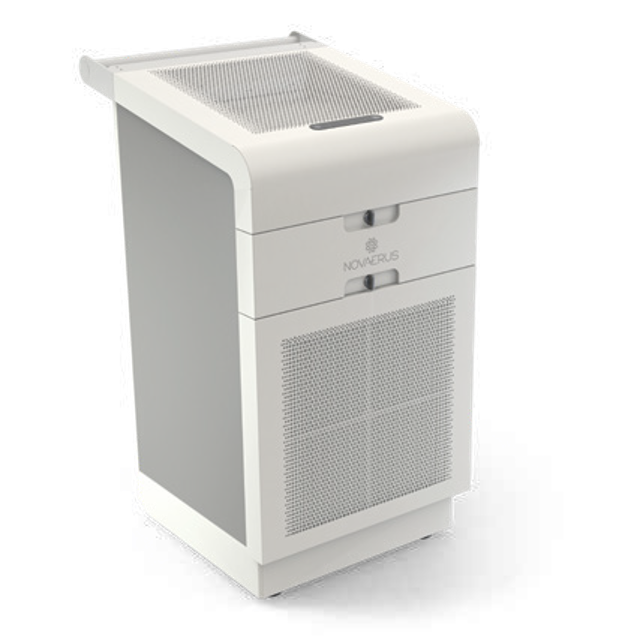
The Defend 1050 (NV 1050) uses WellAir's patented NanoStrike™ technology combined with a triple-stage Camfil® filter system to provide a powerful solution for air disinfection and particle removal.
The Defend 1050 is a free-standing, portable recirculating air cleaning system designed for continuous 24/7 protection in healthcare or other commercial settings to provide airborne infection control.
The FDA has cleared the Defend 1050 as a Class II Medical Device to filter out and inactivate airborne viruses and bacteria for medical purposes within large rooms and indoor spaces.
The Defend 1050 inactivates aerosolized viruses, bacteria, and fungi and purifies the air of pollen, particulate matter (PM), volatile organic compounds (VOCs), and odors.
Please read and follow all instructions in this manual.
Labeling Symbols


Classification of Equipment
Warnings
Technical Specifications
Floor standing, 2-wheeled base + handle, 5 speed fan setting with 6.6 ft power cord
Area Coverage:
200 – 1,000 ft2 ( 4 air changes per hour)
400 – 2,000 ft2 (2 air changes per hour)
Volume Treated:
1,600 – 8,000 ft3 (4 air changes per hour)
3,200 – 16,000 ft3 (2 air changes per hour)
Electrical Rating:
Single phase, 100-120 VAC, 60 Hz Fuse rated at 120 VAC, 6.3 Amps, Listed
Power Consumption:
Maximum 396W
Construction + Color:
Precision-cut fabricated metal casing in a white anti-bacterial powder coat finish.
Dimensions: 36.2” (h) × 19.3” (w) × 23.2” (d)
Weight: Approx. 118.6 lbs
Electrical Connection:
Switched and fused with a grounded, molded and detachable power cord.
Fan Airflow Volume:
Speed 1 = 107 CFM
Speed 2 = 187 CFM
Speed 3 = 267 CFM
Speed 4 = 400 CFM
Speed 5 = 553 CFM
Noise Level:
Speed 1 = 48 dBA
Speed 2 = 56 dBA
Speed 3 = 62 dBA
Speed 4 = 70 dBA
Speed 5 = 78 dBA
Filters:
Stage 1: M5 30/30 filter
Stage 2: HEPA H13 filter, MGA grade
Stage 3: G4 carbon pleated filter
Operating Conditions:
50 – 95 °F, 10 - 75% Relative Humidity
Shipping / Storage Conditions: 41 – 122 °F, Maximum 95% Relative Humidity
Quality + Safety:
Manufactured under ISO 9001, ISO 14001 & OHSAS 18001.
IEC 60601-1, Third Edition IEC 60601-1-2, Fourth Edition
UL 867 Safety for Electrostatic Air Cleaners
FDA K200321.510(k) Class II Medical Device
Instructions for Use
Transporting the Defend 1050
When transporting the Defend 1050, care should be taken when moving the unit to the desired location.
The transporter should be positioned close to the back of the unit holding the transport handle firmly with both hands. The transporter should place one foot against the base of the Defend 1050 for anchorage and pull the handle slowly towards them, stepping back on to their other foot.
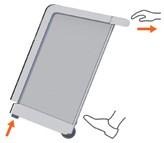
Stabilize the Defend 1050 at a comfortable angle, depending on the transporters individual height, where minimal pressure is exerted against the body to ensure stability.
Once the destination has been reached, allow the unit to gently return to the upright position. The transporter should place one foot against the base of the unit and gently extend their forearms, allowing the unit to rest on its front feet.
The Defend 1050 should be placed in a dry location and connected to a suitable grounded outlet. The product is intended to be used as a floor standing unit only.
Once the product is installed, turn the power switch on the back of the unit to the ON position. The device is now ready to operate, please use the control panel to activate the unit to the desired speed.
Control Panel and Location
The control is located on the top panel of the Defend 1050 near the front of the unit.
The control panel layout is shown in Figure 1. The control features are listed below:
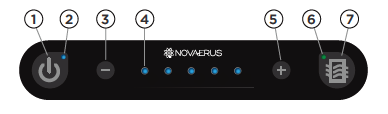
Figure 1: Defend 1050 Control Panel layout.
- ON/OFF power button
- LED light indicator for ON/OFF power state
- Airflow speed selection button, reduce airflow
- LED lights (5 lights) indicating the active airflow speed
- Airflow speed selection button, increase airflow
- LED light indicator of pressure drop check across HEPA filter
- Pressure drop check button across HEPA filter
Power control
The control button on the furthest left-hand side of the control panel is for switching the device ON/OFF; the power button. The power button is clearly illuminated with a blue LED to indicate when the device is on. The blue LED is illuminated when in the ‘ON’ mode and non-illuminated when the device is in the ‘OFF’ mode.
Air flow control
The control allows the user to select the device airflow using selection button ‘+’ on the right-hand side for incrementing the air flow setting to a higher airflow, and ‘-’ on the left-hand side for decreasing the air flow setting to a lower air flow. The air flow setting level is clearly indicated by illuminating a series of blue LEDs in sequence (from left to right) according to the speed setting (e.g. two LEDs for speed II, three LEDs for speed III). The Defend 1050 has 5 selectable air flow speeds.
Save airflow to memory
There is an ability to save a selected airflow to memory so the device will revert to the last known speed on power-on. The last known speed can be saved to memory by holding the ON/OFF (1) and ‘-‘ (3) buttons for three seconds. To revert to factory settings and to clear the air speed memory the ON/OFF (1) and ‘+’ (5) buttons are held for three seconds.
HEPA Filter replacement test
The HEPA filter replacement test indicator is for information purposes only. The filter replace button, for testing the filter back pressure, is on the furthest right-hand side of the panel. Upon pressing the filter back pressure test, the device shall override the air flow setting to speed 5 air flow for testing the filter for a period of approx. 30 seconds. The test button shall remain backlit illuminated blue LED while the device is testing the air pressure.
The device will indicate that the HEPA filter needs to be inspected for replacement by illuminating the test button in orange or a continuous LED light in orange.
The device will indicate that the HEPA filter does not need to be inspected by illuminating the test button in green or a continuous light in green.
Novaerus recommends replacing the HEPA filter every twelve-month (12) period to ensure optimal performance, or when the filter test check output indicates to do so; whichever comes first. Discoloration on the HEPA filter may indicate that the filter has exceeded its life expectancy. The expected lifetime of these filters is approximately twelve months (12) under normal clean air conditions (such as that of a hospital ward).
Service and Maintenance Instructions
Service
No serviceable parts are contained within the Defend 1050 unit. The units should be opened by qualified Novaerus personnel only. The unit is designed with tamper-proof screws to ensure that it cannot be easily opened by anyone other than service personnel.
Maintenance – Replacement of Filters
Before replacing filters, ensure the power is switched off at the rear mains switch. Ensure all filter doors are securely closed before switching the unit back on via the rear mains switch.
Pre-filter
The intake pre-filter is located behind the front panel of the unit. The pre-filter should be inspected monthly and be replaced when dirty.
The pre-filter can be removed by unlocking the latch, simply pulling the framing of the filter outwards and replacing with a new filter.
The metal wire-frame grid should be facing towards the rear of device as shown in the image below. An airflow arrow on the side of the filter shows the correct direction for the installation of the intake pre-filter screen.
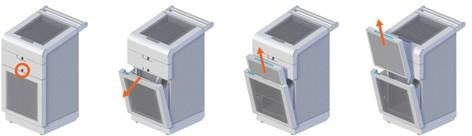
Marking on the Defend 1050 unit corresponding with the required filter.
Markings on the filter to aid placement and correct orientation.

It is recommended to replace this filter after three (3) months of continuous use. It is recommended that the user inspect the intake pre-filter screen monthly during the first 2 months of use to determine the most appropriate cleaning period for its facility. If dust and debris has collected on the intake screen sufficient enough to cause a significant decrease in airflow, more frequent replacement of this filter may be required.
Only Novaerus supplied replacement filters should be used. Please contact Customer Service for replacement filters.
Carbon Filter and HEPA Filter
The Carbon and HEPA filters are located in the top of the unit and are accessible by opening the top panel. The Carbon filter should be removed before gaining access to the HEPA filter.
Marking on the Defend 1050 unit correspond with the required filter.

The Carbon and HEPA filters are fitted with a handle that can be used to pull the filter out of its housing in the Defend 1050 unit.
Carbon Filter
The Carbon Filter can be accessed from the top panel. The orientation of the filter is indicated on the filter frame itself, see illustration below.
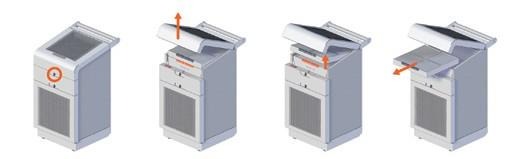
Markings on the filter to aid placement and correct orientation.

The expected lifetime of the Carbon filter is approximately four months (4) under normal clean air conditions (such as that of a hospital ward). It is recommended to replace this filter after four (4) months of continuous use.
Only Novaerus supplied replacement filters should be used. Please contact Customer Service for replacement filters.
HEPA Filter
The HEPA filter can be accessed from the top panel, see illustration below. The orientation of the filter is indicated on the filter frame itself, see illustration below. The Carbon filter should be removed before gaining access to the HEPA filter.
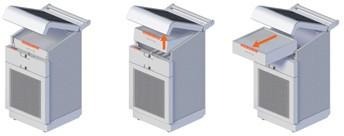
Markings on the filter to aid placement and correct orientation.

Novaerus recommends replacing the HEPA filter every twelve-month (12) period to ensure optimal performance, or when the filter test check output indicates to do so; whichever comes first. Discoloration on the HEPA filter may indicate that the filter has exceeded its life expectancy. The expected lifetime of these filters is approximately twelve months (12) under normal clean air conditions (such as that of a hospital ward).
Only Novaerus supplied replacement filters should be used. Please contact Customer Service for replacement filters.
Filter Disposal
The pre-filter, HEPA and carbon filters are throw-away, dry type air filter units.
The following instructions are for filter disposal for filters used in non-hazardous environments.
To properly dispose of a used non-hazardous air filter:
• Before you begin, turn off the unit
• Have a plastic bag on hand
• Carefully remove the used air filter from the Defend 1050 unit
• Place the filter gently into the bag, without shaking it. This will prevent the filter from releasing dust and particles into the air
• Tie or tape the bag shut
• Take the bagged air filter and place it in the waste disposal
For filters used in environmentally hazardous and/or biomedical hazardous air streams, follow the occupational safety and health administration guidelines in the country of origin.
Cleaning
The unit should be visually inspected for accumulation of dirt and dust on the vent grills that are located in front and above the unit chassis on a monthly basis.
It is recommended that the unit be cleaned using a vacuum cleaning brush from the outside of the unit to remove any dirt and dust that may have accumulated on the grills.
Clean the body of the Defend 1050 regularly to prevent dust from collecting.
1. Wipe away dust from the body of the device with a soft dry cloth.
2. Clean the air outlet with a soft dry cloth.
Troubleshooting
Should the unit sustain severe damage and an increase in noise from the internal parts is observed, discontinue use of the unit and contact a representative of the Novaerus technical team for assistance. This product is not intended to be repaired in the field.
To ensure the Defend 1050 unit’s optimal functionality when replacing the filters, the power must be switched off at the rear mains switch before attempting to open the filter doors. Ensure all filter doors are securely closed before switching the unit back on via the rear mains switch.
Should the unit power up to an unwanted airspeed, the memory can be cleared by holding down the ON/OFF button and the ‘+’ button for three seconds.
Product Certifications
IEC 60601-1, Third Edition
IEC 60601-1-2, Fourth Edition
UL 867 Safety for Electrostatic Air Cleaners
FDA K200321.510(k) Class II Medical Device
Was this article helpful?
That’s Great!
Thank you for your feedback
Sorry! We couldn't be helpful
Thank you for your feedback
Feedback sent
We appreciate your effort and will try to fix the article